
RTX 4060 Cyberpunk 2077 FPS — 1080p & 1440p Benchmark Results
Cyberpunk 2077 is one of the most GPU-demanding games available. The RTX 4060’s 8GB of VRAM and 128-bit memory bus create real limitations at higher settings but DLSS 3 and Frame Generation change what’s achievable.
You can get actual numbers at each setting, explains where the 8GB VRAM limit matters, and tells you exactly how to configure the card for smooth play.
RTX 4060 Cyberpunk 2077 FPS — Benchmark Table
| Settings | Resolution | Avg FPS | Notes |
|---|---|---|---|
| Ultra (no RT, no DLSS) | 1080p | 81 | Comfortable 1080p experience |
| High (no RT, no DLSS) | 1080p | 95 | Smooth with headroom |
| Medium (no RT, no DLSS) | 1080p | 110 | Clear 60+ FPS buffer |
| Ultra + DLSS Quality | 1080p | 90 | Sharper than native at this FPS |
| Ultra + DLSS + Frame Gen | 1080p | 120+ | Smooth but adds input latency |
| RT Medium (no DLSS) | 1080p | 50-60 | Playable, noticeable RT shadows |
| RT Ultra (no DLSS) | 1080p | 35-45 | Below 60 FPS — not recommended |
| RT + DLSS Quality | 1080p | 80-90 | Best RT experience at 1080p |
| Medium (no DLSS) | 1440p | 67 | Acceptable for 60Hz |
| High (no DLSS) | 1440p | 55 | Below 60 FPS without DLSS |
| Medium + DLSS Quality | 1440p | 80-90 | Solid 1440p experience |
Sources: JayzTwoCents early benchmark (81 FPS, 1080p Ultra no DLSS), FrameCoach 2026 testing (81 FPS optimized, 67 FPS at 1440p), TechSpot Phantom Liberty GPU review, NotebookCheck early RTX 4060 testing.
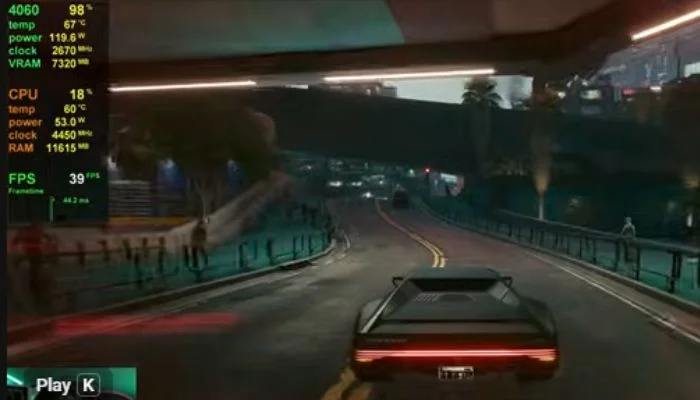
RTX 4060 Cyberpunk: The 8GB VRAM Limit
Cyberpunk 2077 is one of the few games where the RTX 4060’s 8GB VRAM creates a real, measurable problem.
Where VRAM becomes an issue:
- Ultra textures at 1440p push above 8GB
- Any RT preset above Medium at 1440p strains the buffer
- When VRAM fills, the GPU offloads to system RAM causing stutter even when average FPS looks acceptable
The fix: Keep textures at High rather than Ultra at 1440p. This keeps VRAM usage comfortably below 8GB and eliminates the stutter spikes that happen when the buffer overflows.
At 1080p, Ultra textures stay within the 8GB limit. No texture downgrade needed at 1080p.
Does the RTX 4060 Handle Cyberpunk Ray Tracing?
Technically yes. Practically it depends on what you expect.
RT Medium without DLSS at 1080p: 50-60 FPS average. Playable. You see the improvement in contact shadows and ambient lighting.
RT Ultra without DLSS at 1080p: 35-45 FPS. Below 60 FPS. Not smooth for action sequences.
RT + DLSS Quality at 1080p: 80-90 FPS. This is the correct way to run ray tracing on the RTX 4060. DLSS Quality renders at ~1470×828 and upscales to 1080p the output is sharper than native TAA and the FPS is playable.
RT + DLSS + Frame Generation at 1080p: 100+ FPS displayed. Frame Generation is exclusive to RTX 40 series GPUs. The visual result is smooth, but added latency from FG makes it better for story mode than combat-heavy playthroughs.
Ray reconstruction (NVIDIA feature in Cyberpunk patch 2.0+): Available on RTX 40 series. Improves RT reflections and lighting quality. Enable it with DLSS Quality for the best visual-to-performance ratio on the RTX 4060.
Best Cyberpunk 2077 Settings for RTX 4060 (2026)
1080p Maximum FPS, Highest Visuals
- Resolution: 1920×1080
- DLSS: Quality (or Off if you prefer native)
- Ray Tracing: Medium
- Shadows: High
- Textures: Ultra (stays within 8GB at 1080p)
- Screen Space Reflections Quality: Medium
- Ambient Occlusion: Medium
- Volumetric Fog Resolution: High
- Post-Processing: High
- Frame Generation: Off for action, On for exploration
Expected result: 80-90 FPS with RT Medium + DLSS Quality at 1080p.
1440p — Balanced Settings
- Resolution: 2560×1440
- DLSS: Quality (essential at 1440p)
- Ray Tracing: Off or Low
- Shadows: High
- Textures: High (not Ultra stays under 8GB)
- Screen Space Reflections Quality: Medium
- Cascaded Shadows Range and Resolution: Medium
Expected result: 80-90 FPS with DLSS Quality at 1440p, no RT.
RTX 4060 vs RTX 4060 Ti in Cyberpunk 2077
| GPU | 1080p Ultra No RT | 1080p RT Medium + DLSS |
|---|---|---|
| RTX 4060 (8GB) | 81 FPS | 80-90 FPS |
| RTX 4060 Ti (8GB) | 100 FPS | 100-110 FPS |
| Difference | ~23% | ~20% |
The RTX 4060 Ti produces roughly 20-25% more FPS in Cyberpunk 2077 at the same settings. Both cards share the same 8GB VRAM limitation. If Cyberpunk is your main game and you want 60+ FPS at 1440p without DLSS, the 4060 Ti is the better choice.
Is the RTX 4060 Good Enough for Cyberpunk 2077?
At 1080p: yes. 81 FPS at Ultra settings without DLSS is smooth. Enable DLSS Quality and you gain another 10-15 FPS with no visible quality loss.
At 1440p: borderline. The 8GB VRAM and 128-bit bus create a ceiling. You need DLSS Quality enabled to stay above 60 FPS at High settings. Without DLSS, 1440p High averages around 55 FPS.
At 4K: not recommended without DLSS Performance mode, which significantly reduces image quality.
Frequently Asked Questions
What FPS does the RTX 4060 get in Cyberpunk 2077?
At 1080p Ultra settings without DLSS or ray tracing: 81 FPS average. With DLSS Quality added: 90 FPS. With DLSS + Frame Generation: 120+ FPS displayed.
Can the RTX 4060 run Cyberpunk 2077 with ray tracing?
Yes. RT Medium with DLSS Quality at 1080p returns 80-90 FPS the correct way to run ray tracing on this card. RT Ultra without DLSS drops below 60 FPS.
Does Cyberpunk 2077 use more than 8GB VRAM on the RTX 4060?
At 1080p Ultra textures: no. At 1440p Ultra textures: yes VRAM overflows and causes stutter. Keep textures at High at 1440p to stay within the 8GB limit.
What is the best DLSS setting for RTX 4060 in Cyberpunk?
DLSS Quality mode. It renders internally at approximately 67% resolution and upscales using AI. At 1080p and 1440p, the image quality is indistinguishable from native at normal viewing distances and adds 15-25% FPS.
Does Frame Generation work on RTX 4060 in Cyberpunk 2077?
Yes. Frame Generation is available on all RTX 40 series GPUs in Cyberpunk 2077. It doubles displayed frame rate but adds input latency. Use it for story exploration, not high-reflex combat sequences.
What CPU pairs best with RTX 4060 for Cyberpunk 2077?
Cyberpunk is GPU-bound at 1080p on the RTX 4060 — the GPU is the bottleneck, not the CPU. A Ryzen 5 7600 or Core i5-13400F is sufficient. Upgrading CPU above these will not improve FPS.
Benchmark data referenced from TechSpot Phantom Liberty GPU benchmark, FrameCoach 2026 testing, JayzTwoCents early RTX 4060 benchmark, and NotebookCheck RTX 4060 review.